Optimization
There are many ways to solve a problem. Optimization is finding the best way. Section 1 prioritizes readability to make code easy to work with. This chapter covers how to optimize for speed and memory use.
Ideally, you want to write code optimized for readability, speed, and memory use. However, in some cases, one comes at the cost of another.
Factors like how noticeable a delay is, how valuable a resource is, and the degree of optimization gained all tie into what you should optimize for. Ask yourself; "What would the user notice/prefer?".
A video game will heavily prefer performance over memory since it's reliant on fast calculation for its framerate. Improving the speed of a calculation that runs every frame by 5ms can raise the framerate from 60 to 90fps. A smaller system like a smartwatch might have limited RAM and prefer to save as much memory as possible.
Perfectionists beware!
Before optimizing something, make sure it's worth the effort. If neither memory nor speed is crucial for an implementation, you're better off using your development time to progress your project.
A need for perfection can often lead to procrastination or wasting time on insignificant code improvements.
The best way to optimize your code is to develop good practices so that you only have to actively think about it when you notice an area of your program running slow or taking up an unreasonable amount of resources.
Optimizing for Processing Power
Improving performance mainly involves reducing the operations a computer has to perform.
double problemSolver(int N, double in) {
    double result = 0;
    for (int i = 0; i < N; i++)
        result += expensiveFunction(in) * i;
    return result;
}
expensiveFunction is called for every cycle of this loop. Assuming it returns the same value every time, we can avoid unnecessary calculations by moving it out of the loop.
double problemSolver(int N, double in) {
    double result = 0;
    double expensiveResult = expensiveFunction(in);
    for (int i = 0; i < N; i++)
        result += expensiveResult * i;
    return result;
}
expensiveFunction goes from running N times to running once.
Prefer equations over loops
Even though expensiveFunction was moved out of the loop in the example above, the other operations still run N times. Avoiding loops eliminates this operation increase.
result += expensiveResult * i;
i ranges from 0 to N with an average value of N/2. We can create an equation from the loop, where result equals the average value of each loop (N/2*expensiveResult) multiplied by how many times the loop will run (N).
double problemSolver(int N, double in) {
    double expensiveResult = expensiveFunction(in);
    return N * (N/2.0) * expensiveResult;
}
This function is even further optimized. Not counting double expensiveResult = expensiveFunction;, the loop-less function performs 3 operations (2 multiplications and a division). The looped function performs 4 * N operations (2 additions, one multiplication, and one comparison per loop).
| Function Call |
Looped Operations |
Loopless Operations |
| problemSolver(10) |
40 |
3 |
| problemSolver(10000) |
40000 |
3 |
O notation
The increase in the number of calculations based on a parameter is known as the complexity of a function and is denoted with a capital O.
double problemSolver(int V) {
    double result = 0;
    for (int i = 0; i < V; i++) // This gives you result = v*v
        result += 2 * i;
    return result;
}
This code increases calculations linearly with V, meaning its complexity is O(n), where n denotes the number of iterations of the loop.
The letter O is used because the complexity of a function is also referred to as the order of the function.
Loops running N times, N/2 times, and N*5 times are all considered O(n) because they grow at the same rate with n.
double problemSolver(int N, double in) {
    double result = 0;
    for (int i = 0; i < N; i++)
        for (int j = 0; j < N; j++)
            result += in* i * j;
    return result;
}
Using 2 nested loops that scale with n gives you a complexity of O(n^2). This function scales even worse than O(n), quadratically requiring more calculations.
n can be anything that causes the complexity to grow. In most algorithms, it's the number of elments in an array.
This code finds the max value in an array and has O(n) complexity.
template <typename T>
T getMaxElementIndex(T arr[], unsigned int size) {
	T maxValue = arr[0];
	unsigned int maxIndex = -1;
	for (int i = 0; i < size; i++) {
		if (maxValue < arr[i])
		{
			maxValue = arr[i];
			maxIndex= i;
		}
	}
	return maxIndex;
}
If an array is sorted, the max element index will be the last element (size - 1). Getting this has an O(1) complexity. This shows how knowledge about your data can lead to more efficient code.
The higher the complexity of a function, the quicker it slows down as n increases.
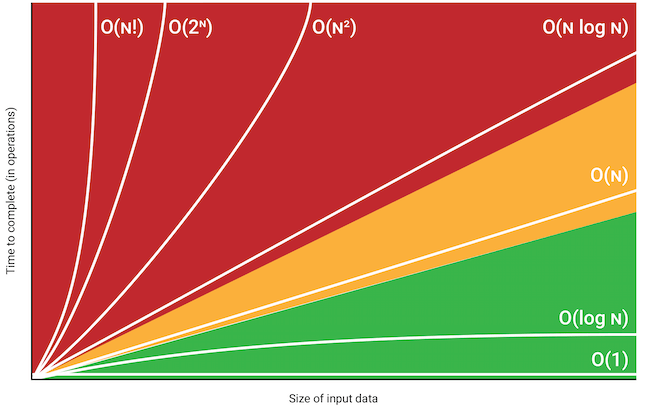
[TODO: Make tabs that let you highlight different graphs with example codes for different complexitites]
Common optimizations - Data structures
Every time an object is copied, the program has to set aside memory for the new copy, initialize it, and eventually clean it up. This can require a lot of memory and processing for large or complex objects.
void functionCall(const std::string& parameter);
Passing large objects as addresses with const references or pointers lets you access their data without creating a copy.
Passing objects by references or pointers requires copying the address and comes with the added dereferencing overhead. Because of this, smaller datatypes aren't passed as const references or pointers.
Storing your data in an appropriate structure is important for optimal use of system resources. We have an entire chapter covering different data structures in-depth, but here's a quick rundown of the standard C++ containers.
| Container |
Description |
| std::vector |
Provides fast access and is suitable for various applications. |
| std::array |
Useful when a fixed-size array is needed, offering the benefits of compile-time size checking while maintaining a similar interface to std::vector. |
| std::deque |
Allows fast insertion and deletion at both ends. Often picked when std::vector limitations with front operations are an issue. |
| std::map |
Provides a sorted container that stores key-value pairs. Used when order and unique keys matter, such as in dictionaries. |
| std::unordered_map |
Used for hash table-based key-value storage. Provides an O(1) average time complexity for lookup, insertion, and deletion. |
Speed optimization - Logical structure
[This chapter can basically be summarized as: "now we are adding a layer of complexity by not only considering blanket conditions, but also the cost of each condition." A quick summary with a follow up explaining cost considerations should be enough]
We mentioned placing blanket conditionals early in else-if chains to reduce the comparisons needed in chapter 4.
if (in2 == 0 && in3 == 0) {
    std::cout << "Both inputs are invalid";
}
else if (in2 == 0) {
    std::cout << "Your second input is invalid";
}
else  if (in3 == 0) {
    std::cout << "Your third input is invalid";
}
We know that in2 and in3 can't both be 0 by the first else if, so we only need to check one of the inputs in the following statements. This avoids extra comparisons.
Another factor to account for is the cost of conditionals.
bool containsOnlyVowels(const std::string& str) {
	for (char c : str) {
		if (c!='a' && c !='A' && c!='e' && c!='E' && c!='i' && c!='I' && c!='o' && c!='O' && c!='u' && c!='U' && c!='y' && c!='Y')
		return false;
	}
	return true;
}

int main() {
	std::string input;
	std::cout << "\nPlease input string of vowels longer than seven characters.\n";
	std::cin >> input;

	if (input.length() > 8 && containsOnlyVowels(str))
		std::cout << "Valid input, continuing.";
}
Both conditions have to be true for the console output call. However, note that the first condition is O(1) while the second is O(n). This order makes it so that we only do the expensive check if the cheap check is validated.
The same logic applies to the || operator, as the program ignores the second condition if the first one returns true.
You can also order them based on their likelihood of returning a value that decides the whole statement. In a || check, placing the statement most likely to be true first makes sense, as the computer can ignore the second statement more often. In a && check, placing the statement most likely to be false first makes sense, as it lets the computer ignore the second statement more often.
The same guidelines apply when structuring if, else if, and else statements. You generally want the most likely to be true statements first so that the remaining statements can be ignored unless the cost of the statements differs enough to warrant placing the cheaper statements earlier.
Optimizing for Memory Use
ram vs disk | memory vs storage
The variables and objects currently reserved by your program use the computer's RAM. Using information stored in RAM is faster than stored on the disk. However, most computers have much more diskspace than RAM.
In addition to saving data you want to keep beyond the lifetime of your program, you can store large pieces of rarely accessed data to the disk to free up memory.
Working with resources
static ImgPtr image_ptr = resourceManager.loadImg("path/image.png");
render::image(image_ptr, 0, 0, 480, 260);
Programs that work with large resources like pictures, etc., often load the resource once and exclusively use pointers whenever referring to it to avoid the cost of copying them.
Large datasets
If you're working with large chunks of data, you may require unique methods specific to the files/data you're working with.
If you're making a video editing program, loading a 32GB video file into RAM is unrealistic. You have to find a way to segment it and only load the relevant pieces of it.
Multithreading
A thread is simply a path of execution within a program. You can run many pieces of code simultaneously by using more than one thread (multithreading).
The <thread> library provides a straightforward way to work with threads.
#include <iostream>
#include <thread>
#include <chrono>

// We want our thread to start inside this function
void printMessage() {
    std::cout << "Thead 1\n" << std::endl;
    std::this_thread::sleep_for(std::chrono::milliseconds(500));
    std::cout << "Thread 2\n";
}

int main() {
    std::cout << "main 1\n";
    std::thread thread_obj(printMessage); // Start new thread inside `printMessage`
    std::this_thread::sleep_for(std::chrono::milliseconds(200));
    std::cout << "main 2\n";
    thread_obj.join();                    // Wait for the thread to finish
    return 0;
}
main 1
thread 1
main 2
thread 2
std::thread thread_obj(printMessage); creates a new thread that starts executing the code in void printMessage() while our original code execution continues inside int main(). Since code execution runs as fast as possible, we use sleep_for to ensure that our outputs come in our desired order.
thread_obj.join() waits for the thread to finish running its function before proceeding, effectively "joining" the threads. Without thread_obj.join(), the program would end after outputting "main 2\n" and the application would close before the thread outputs "thread 2\n".
Propper Multithreading Management
The .detach() Function
If your thread is a background process that doesn't require the main thread's attention, you can use thread.detach() to run it independently from the main thread. You cannot join detached threads, so the program has no control over their execution once detached. This can make tracking and resolving issues harder.
Data Races
A data race is when 2 or more threads access shared data at the same time, with one of them modifying it. Without a way to control which thread accesses or updates the data first, this can result in corrupted data, crashes, or logical errors in the program, mainly if the operations depend on the order of access.
You can use synchronization mechanisms like mutexes (discussed in the next lesson) to manage access and avoid this problem.
Don't overuse threads
Each thread consumes memory and CPU resources. Creating more threads than the system can efficiently handle can lead to bottlenecks, reduced responsiveness, and po tential system instability.
std::mutex
A mutex (mutual exclusion) prevents data races by stopping threads from accessing data at the same time. It lets a thread say; "I'm using this now, so get in line". Other threads that want access to the same data will stop and wait for their turn.
Once you've included the <mutex> header, you can declare a std::mutex object to use. You should call std::mutex::lock() before using a shared resource to reserve access to it. std::mutex::lock() waits for the mutex to unlock before locking it and continuing.
You should call std::mutex::unlock() when you finish using a shared resource so that other threads can use the mutex.
#include <iostream>
#include <thread>
#include <mutex>

int counter = 0;
std::mutex mtx;

void increment() {
    for (int i = 0; i < 1000; ++i) {
        mtx.lock(); // Lock the mutex
        ++counter; // Only one thread can access this at a time
        mtx.unlock(); // Unlock the mutex so another thread can use it
    }
}

int main() {
    std::thread t1(increment);
    std::thread t2(increment);

    t1.join();
    t2.join();

    std::cout << "Final Counter Value: " << counter << std::endl;
    return 0;
}
Final Counter Value: 2000
Without the mutex, ++counter; creates a data race, resulting in the final output likely being less than 2000.
The importance of unlocking
Manually locking and unlocking a mutex is prone to errors. If a thread ends early, throws an exception, or if you forget to include an mtx.unlock() call, a mutex can be permanently left locked.
lock_guard
std::lock_guard is a simple mutex wrapper. It locks a mutex when declared and unlocks it when destroyed.
#include <mutex>

std::mutex mtx;

void safeFunction() {
    std::lock_guard<std::mutex> lock(mtx); // Lock the mutex
    // Access shared resource
} // Mutex automatically unlocks here
The lock_guard automatically unlocks the mutex when code execution reaches the end of the scope.
unique_lock
std::unique_lock functions like std::lock_guard. However, it also lets you manually lock and unlock the mutex using std::unique_lock::lock() and std::unique_lock::unlock().
Notes
If two threads lock different mutexes in a different order, they can block each other indefinitely. This happens when both are waiting for a mutex the other thread has locked.
#include <iostream>
#include <thread>
#include <mutex>

std::mutex mutex1;
std::mutex mutex2;

void thread1() {
    std::lock_guard<std::mutex> lock1(mutex1); // Lock mutex1
    std::this_thread::sleep_for(std::chrono::milliseconds(100)); // Simulate work
    std::lock_guard<std::mutex> lock2(mutex2); // Try to lock mutex2
    std::cout << "Thread 1 completed.\n";
}

void thread2() {
    std::lock_guard<std::mutex> lock2(mutex2); // Lock mutex2
    std::this_thread::sleep_for(std::chrono::milliseconds(100)); // Simulate work
    std::lock_guard<std::mutex> lock1(mutex1); // Try to lock mutex1
    std::cout << "Thread 2 completed.\n";
}

int main() {
    std::thread t1(thread1);
    std::thread t2(thread2);

    t1.join();
    t2.join();

    return 0;
}
Both threads wait for each other to release their locked mutex, causing a deadlock where neither can proceed.
A softer version of this can also occur if a thread holds a mutex for too long, leading to blocks in other threads and slowing down your program.
GOOD JOB!
You finished a chapter.
This would be a good time to practice what you've just learned.
PracticeNext Chapter