Inheritance
You can create a new class that inherits attributes and behaviors from an existing class. Inheritance is good for code reusability and organization.
By the end of this module, you'll know how to leverage inheritance to build scalable and efficient object-oriented programs that mirror the real-world relationships between objects.
Example
A square and a circle are both shapes and share traits like perimeter and area. We can illustrate this in code by creating a base class shape2D that contains shared traits and making 2 derived classes; circle and square.
class shape2D {
    public:
    float area;
    float perimeter;

    float get_area() {
        return area;
    }

    float get_perimeter()
    {
        return perimeter;
    }
};
Adding : public base_class_name behind the name of the class when declaring it will make it inherit members from another class (base_class_name)
// `circle` now has the same member variables and functions as `shape2D`
class circle : public shape2D {
public:
    float radius;
    circle(float rad) : radius(rad) {
        area = rad*rad*M_PI;
        perimiter = rad*2*M_PI;
    }
};
NOTE: M_PI is a constant defined in <math.h>. Include #include <math.h> in your file to access it.
The class circle shares the member variables and member functions from the shape2D class.
circle obj(5);
std::cout << obj.get_area(); // You can call shape2D's member functions
std::cout << obj.perimeter; // and use its member variables
You can do the same thing for the square class. Try thinking about how to adapt the circle class into a square class.
Sharing inheritance from the same base class will make all square and circle objects share the area and perimeter members and the get_area() and get_perimeter() methods.
Access levels in inheritence & the protected keyword.
When a class inherits from another, it will copy all its member variables, both private and public. However, you can't access the private members of the parent class from inside the child class.
Many classes are designed to be inherited to use. We still want to use good encapsulation design to avoid the programmer changing internal variables. Leaving the private members inaccessible from the child class removes the possibility of screwing things up by changing values that aren't supposed to be changed when inheriting a class.
You often want to access inherited members without exposing them to the public scope. Luckily, you don't have to choose.
The protected: access specifier lets you access members inside the class and classes that inherit from the original one. It does this without exposing the members through objects.
Summary of when to use each access specifier
private:: When you want access to a variable inside the main class but don't want to expose it through objects or inherited classes.
public:: When you want access to a variable inside the class, inherited class, and from an object.
protected:: When you want to access a variable from inside a child class but don't want access to it through the object.
Method overriding
If you declare a function in the derived class with the same name and
the same signature as a function in the base class, this function will be called instead of the base class's function. This lets us create more specific behavior for our class. We can replace or extend the base functionality instead of just inheriting it.
class Animal {
public:
    void eat() {
        std::cout << "This animal eats food." << std::endl;
    }
};

class Dog : public Animal {
public:
    void eat() {
        std::cout << "The dog eats meat." << std::endl;
    }
};
The override keyword:
You can use the override keyword to note that the function is an override explicitly. This isn't mandatory, but it's good practice because it enhances code clarity. It also makes the compiler check that your function is indeed overriding a base class method and warns you if it isn't, making it great for avoiding bugs.
Base class pointers
You can store objects of derived classes in pointers or references of base classes.
class BaseClass {
    public:
    void print_class_type() {
        std::cout << "BaseClass-print\n";
    }
}
class DerivedClass : public BaseClass {
    public:
    void print_class_type() {
        std::cout << "DerivedClass-print\n";
    }
}
BaseClass* obj_ptr = new DerivedClass();
Storing an array of base class pointers is very useful for managing data. A zoo can use std::vector<Animal*> animals_in_enclosure; to store a variety of animals inherited from the class Animal.
Because the DerivedClass has everything a BaseClass has, you can use it like a BaseClass. It is important to note that obj_ptr is handled like a BaseClass* by the compiler, even if it points to a DerivedClass object. This means that the function overload of print_class_type from DerivedClass won't be used.
BaseClass* obj_ptr = new DerivedClass();
obj_ptr->print_class_type();
BaseClass-print
BaseClass::print_class_type is called because of the pointer type.
This can be problematic because it leads to incorrect or generalized behavior where you might want specialized behavior.
You can cast the pointer to a derived class to call the function from that derived class.
reinterpret_cast<DerivedClass*>(obj_ptr)->print_class_type();
DerivedClass-print
You could track the class-type with a member variable in the base class and use that to cast the object before calling a function. However, this leads to more problems. It increases the complexity and creates maintenance and scalability problems. You would have to do this for every function call and change all of them whenever you want to add a new derived type.
The next section will cover virtual functions, which provide a better solution for automatically selecting the right function based on the objects actual type.
Virtual functions
The compiler decides which function to call when the program compiles. This leads to faster run-time speeds at the cost of lacking run-time knowledge about data.
In this program, the compiler cannot know what type of elements will be in the obj_ptr class. Because of this, it defaults to calling BaseClass::print().
int main() {
    std::cout << "Select 1 or 2\n";
    int selection;
    std::cin >> selection;
    BaseClass* obj_ptr = nullptr; // Empty pointer
    if (selection == 1)
        obj_ptr = new FirstDerivedClass();
    else if (selection == 2)
        obj_ptr = new SecondDerivedClass();

    obj_ptr->print(); // This element is either a FirstDerivedClass, or SecondDerivedClass, but it will call BaseClass::print
}
The compiler cannot check what object obj_ptr holds because it isn't given a type before the program runs.
Declaring a function as a virtual function makes it evaluate which function to call during runtime instead. This means that the program can look at what the datatype in memory is and call the "right" function.
virtual void print() {
    std::cout << "some printing";
}
Pure virtual functions /Abstract classes
When designing base classes, you can declare virtual functions without defining them. A virtual function without a definition is a pure virtual function, and requires a slightly different syntax.
virtual void pure_virt_func() = 0;
The = 0; tells the compiler that we don't intend to specify the function's behavior. This lets you define the function behaviors in the inherited classes.
Including pure virtual functions in a base class prevents you from creating objects of the BaseClass, as it's incomplete due to the lack of declared function behavior. A class like this is called an abstract class. They're useful for base classes that don't make sense to have instances of. For example, every animal is part of a species, so there is no instance of just Animal.
You can use abstract classes for pointers because they can only point to objects of types inherited by the base class. Since the missing function is virtual; calling it from a base class pointer will call the function of the object it points to.
You can't use the pointer to access an object of BaseClass, so there is no casting, declaring the object, using it as parameters, or return types unless they are pointers.
The only way to use the base class with a pure virtual function is through classes that inherit it and define/override the pure virtual function. You can still use pointers of the class to store instances of inherited classes.
Any class that inherits an abstract class without defining behavior for all pure virtual functions also becomes an abstract class.
Constructors
Initialization of inherited classes varies a bit from normal struct initializations. You cannot define variables from an inherited class in the initialization list. You have to initialize them in the code block. You cannot directly access (and thus initialize) private base members from the inherited class constructor.
struct base {
    float kiki;
private:
    float kaka;
};

struct derived : base {
    float bouba;
    derived() : bouba(5)/*, kiki(10) [This would cause an error]*/ {
        kiki = 10; // This is fine.
        //kaka = 20; // [This would cause an error]
    };
};
Just like you can call a constructor from another constructor's initialization list, you can call a base class constructor from your initialization list.
struct base {
    base(float _kiki, float _kaka) : kiki(_kiki), kaka(_kaka)
    {
    }
    float kiki;
private:
    float kaka;
};

struct derived : base {
    float bouba;
    derived() : base(5.f, 5.f) {
        // Now all the members of `base` are initialized
    };
};
The program automatically calls the base class's default constructor if you don't call a base class constructor in the initialization list.
Inheritance Access
The access specifier used when inheriting a class determines the access specifier that inherited members get. We've been inheriting using class derived_class : public base_class, which doesn't change or restrict access to any members.
If you inherit using class derived_class : protected base_class, all inherited public members are given the protected access. This effectively limits derived_class objects' access to base_class members outside of derived_class's scope.
If you inherit using class derived_class : private base_class, all inherited members are given private access. In addition to stopping code outside of derived_class from using base_class members, this also restricts access from any classes inheriting from derived_class.
Multiple Inheritance
You can make a class inherit from multiple base classes by separating the base classes with commas.
struct base1 {
	int member_var1;
};
struct base2 {
	int member_var2;
};
// `derived` now includes both `member_var1`, and `member_var2`
struct derived : public base1, public base2 {
};
This lets you inherit members from multiple classes.
Duplicate members
Multiple inheritances can lead to members with the same name/signature from each base class. When this happens the compiler has a hard time telling them apart, and will throw an ambiguity error when you try using the member.
struct Student {
	int student_id;
	std::string name;
};

struct Employee {
	int worker_id;
	std::string name;
	float hourly_pay;
};

struct WorkingStudent : public Student, public Employee {

	WorkingStudent(std::string _name) {
		// The compiler doesn't know which `name` to use
		name = _name; // ERROR: There are 2 `name` members
	}
};
The compiler is okay with inheriting members with the same name, but it needs to know which one to use. We can specify which class' member we're referring to by prefixing the member with the class it comes from. This gives the compiler enough information to compile and run the program.
struct WorkingStudent : public Student, public Employee {

	WorkingStudent(std::string _name) {
		// Now the compiler knows which `name` to use
		Student::name = _name;
	}
};
If you need to refer to this after from an object, you can place the prefix after the . operator.
WorkingStudent student("Edward");
student.Employee::name = student.Student::name; // Syncing the names
Designs for Inheritance
Avoid Complexity
Simple code is maintainable and often best for performance. Using inheritance, especially if you use multiple inheritance or layers of inheritance, adds complexity to your code. Sometimes the complexity isn't needed to solve the problem you're trying to address. Avoid complexity when you don't need it.
You should only use inheritance when your class "is" another class. For example, a car has an engine, but it isn't an engine. Here you should declare an Engine engine; member variable instead of inheriting.
Diamond problem (multiple inheritance)
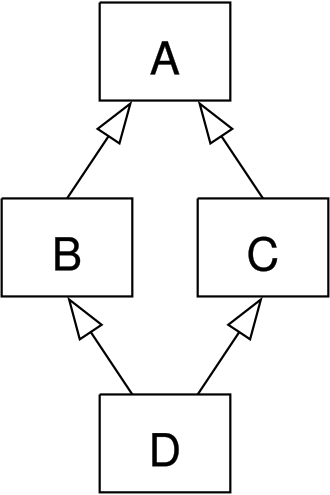
One danger of multiple inheritance is inheriting from 2 or more classes with the same base class. This creates a diamond-shaped inheritance diagram. img
This creates a whole mess of ambiguity, duplicate members, and complexion without being necessary for solving the problem. The compiler can often make sense of this structure, but for your own sake, do not do it.
Friend Functions
Creating functions that work closely with the internals of multiple classes can be difficult without access to the private and protected members of the classes.
You can mark a function as a "friend function" to a class. Code placed inside a friend function can access private and protected members from the granting class. You can use this with objects declared inside the function or passed through parameters.
You have to "befriend it" inside the struct/class you want it to have access to. Doing so does not make it part of the struct/class.
class Example {
    friend void foo(A&);  //  <-- makes it a friend function
private:
    int secret = 42;
};

void foo(A& a) {
    // foo can access a.secret even though it's private.
    std::cout << a.secret << std::endl;
}
Friend classes
Some classes have a managing role over others. For example; a car needs to manage the engine. You can give a class access to the private members of another class by marking it as a friend class.
By marking the car class as a friend class inside the engine class, we give it access to the private and protected members of the engine without exposing them to the public scope.
#include <iostream>

class Engine {
private:
    int horsepower;
    bool isRunning;

    void start() {
        isRunning = true;
    }

    void stop() {
        isRunning = false;
    }

public:
    Engine(int hp) : horsepower(hp), isRunning(false) {}

    // Declare Car as a friend class
    friend class Car;
};

class Car {
private:
    Engine engine;

public:
    Car(int hp) : engine(hp) {}

    void startCar() {
        engine.start();
	std::cout << "Engine started." << std::endl;
    }

    void stopCar() {
        engine.stop();
	std::cout << "Engine stopped." << std::endl;
    }
};

int main() {
    Car myCar(150);
    myCar.startCar();
    myCar.stopCar();

    return 0;
}
GOOD JOB!
You finished a chapter.
This would be a good time to practice what you've just learned.
Last ChapterPracticeNext Chapter